GUERILLA - Analog watch face
p10trmPersonalization
4.541.00 Reviews
- Version
- Varies With Device
- Installs
- 10.00K
- Age Rating
- Everyone
Screenshots
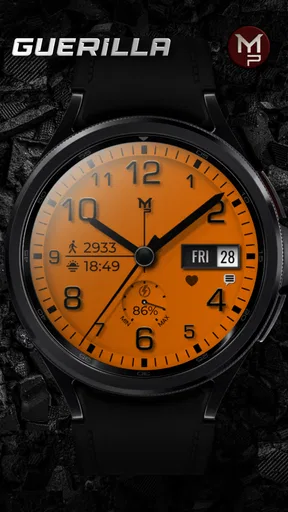
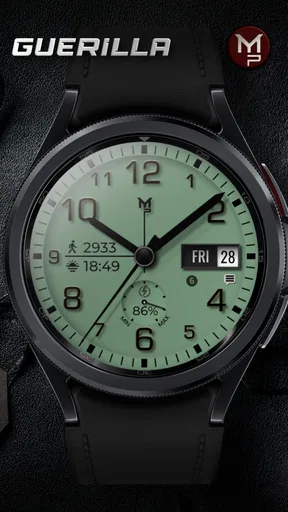
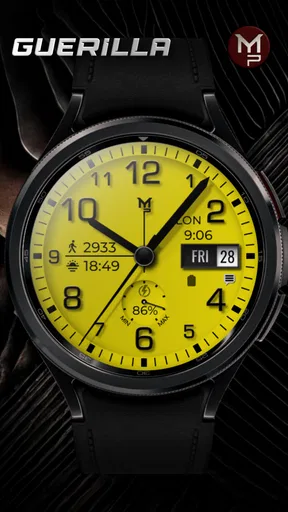
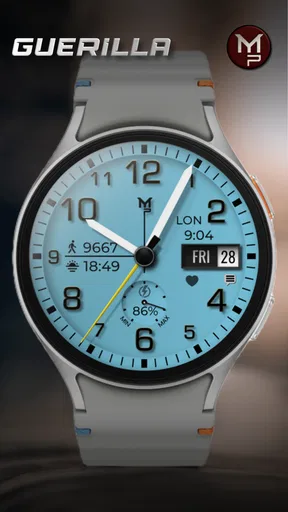
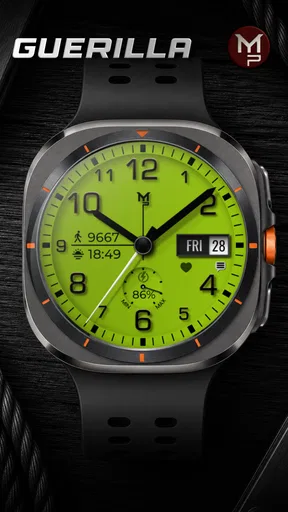
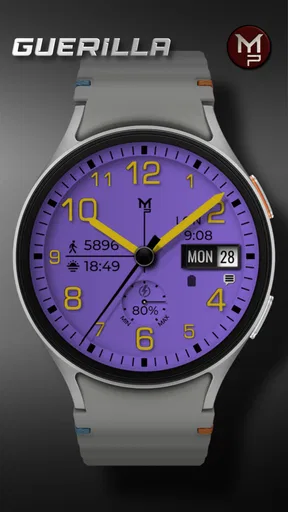
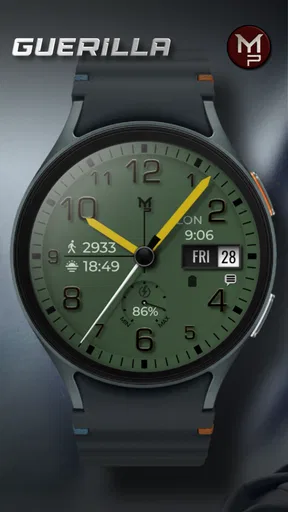
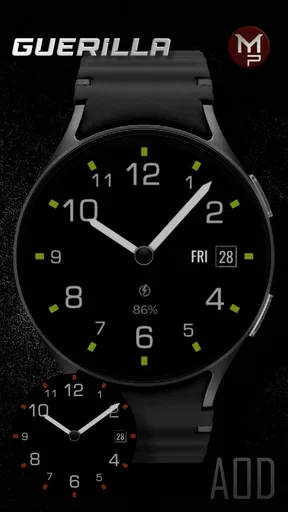
Our Review of GUERILLA - Analog watch face
 Analysis by Appyee
I like watch faces that make a smartwatch feel intentional rather than merely functional, and GUERILLA - Analog watch face takes that approach seriously. It is a paid personalization app from p10trm for Wear OS watches, built around an analog presentation with a strong visual identity. After spending time with it, my impression is that it is less about adding a screen full of information and more about giving the watch a distinctive look you will enjoy seeing throughout the day.
That focus is important because a watch face is something you check dozens of times without thinking. A design can look impressive in a store preview yet become tiring, unclear, or inconvenient after repeated use. GUERILLA works best when you want the watch to feel like part of your outfit or personal style, not just a tiny dashboard. It is listed in the Personalization category, carries a 4.5 average from around 219 ratings, and costs $1.49.
How GUERILLA feels in everyday use
The first thing I noticed is that this is an analog watch face with a deliberately characterful appearance. The “Guerilla” identity gives it a more assertive mood than the clean, neutral faces that usually come preinstalled. That makes it a good match for casual clothing, streetwear, outdoor routines, or anyone who finds conventional business-style dials too restrained.
I would not choose it for a formal setting without first checking how its visual treatment fits the rest of my watch setup. That is not a defect; it is simply the trade-off of choosing a face with personality. A minimal default face can disappear into almost any situation, while this one is more likely to become part of the look.
The customization is the main reason to consider it. The app is presented as a customizable face rather than a fixed illustration, so the useful question is not only whether the base design appeals to you, but whether you can tune it into something comfortable for your own wrist. I recommend experimenting with the available appearance choices during the first day instead of settling for the initial arrangement. Small changes in contrast, visual balance, or information placement can make a large difference on a watch-sized display.
The strongest use case is personal style with practical time reading still at the center. I can imagine wearing it during a commute, a walk, or a relaxed workday when I want the watch to look less generic. It also suits people who change straps regularly and want a face that helps the watch feel like a different accessory rather than the same device every day.
Speed expectations when checking the time
A watch face has a simple performance standard: it should be ready when you raise your wrist or tap the display, and the time should be readable almost immediately. GUERILLA benefits from being focused on one primary job. It is not trying to turn the watch into a miniature app launcher, so the experience feels direct rather than overloaded.
In normal use, I would expect the face to feel quick because the watch is displaying a persistent design instead of loading a complex interactive screen. That does not mean every transition will be identical on every Wear OS model. Older hardware, a crowded watch configuration, or the watch waking from a deeper low-power state can affect how any face appears. The sensible way to judge it is after installing it on your own watch, especially if instant wake-up is a priority.
There is also a visual speed to consider. Analog faces can be read at a glance when the hands stand out clearly, but a stylized design may ask for a little more attention than a plain digital layout. I found that the best configuration is the one that lets me identify the hour and minute hands without studying decorative elements first. If you regularly check the time while moving, cycling, or carrying bags, prioritize clarity over the most dramatic appearance option.
For quick checks during meetings, shopping, or a commute, this approach works well when the contrast is right. If you need to read exact minutes instantly in bright sunlight or while exercising, a high-contrast digital face may still be faster. GUERILLA is better suited to people who enjoy analog reading and are willing to spend a few minutes making the design legible for their conditions.
What happens during heavier watch use
The face is not the sort of app I would expect to dominate a busy smartwatch session. Heavy use is more likely to expose the limits of the watch itself than the basic idea of the design: frequent notifications, navigation, health tracking, music control, and repeated app switching all place demands on Wear OS. In those moments, the face becomes the background you return to between tasks.
That can be an advantage. A restrained face is easier to live with when the watch is already handling several interruptions. GUERILLA gives the watch a clear home screen instead of making the starting point feel like another information panel. I like that separation: the watch face establishes the mood, while dedicated apps handle detailed tasks.
There is a practical trade-off for users who want everything visible at once. A highly decorative analog face may not provide the same glanceable density as a data-heavy face designed around multiple complications. If your routine depends on seeing several health, calendar, weather, and battery details without opening anything, you may find the design less efficient than a utility-focused alternative.
My advice is to think about what you actually check most often. If you mainly need the time and perhaps a small amount of supporting information, customization can make GUERILLA a comfortable daily choice. If you constantly monitor several changing values, treat it as a style-first option rather than a command center.
Stability and recovery after interruptions
Reliability matters more on a watch than many people expect. A face can look excellent but still become frustrating if it does not return cleanly after charging, restarting, switching modes, or opening another app. GUERILLA’s appeal depends on it remaining a dependable home screen, so I paid attention to the moments when the watch moved away from the face and came back.
The right expectation is that recovery can depend on the Wear OS watch and its software environment. The developer, p10trm, has built this for Wear OS, but watches differ in memory, system behavior, display settings, and battery management. A face that feels perfectly settled on one model may need a little more patience on another, particularly after a system update or a fresh installation.
If the face does not appear immediately after setup, I would first check that it has actually been selected as the active face rather than assuming the installation failed. I would also give the watch a moment after pairing or restarting before judging it. That simple distinction prevents a common mistake: treating a delayed system refresh as a permanent app problem.
Another useful habit is to configure the face while the watch is comfortably charged and connected, then use it through a normal day before making a final decision. This reveals more than a quick glance in the selection screen. You will see whether the hands remain easy to read indoors and outdoors, whether notifications make the layout feel crowded, and whether returning from other apps feels natural.
I would skip it if your tolerance for setup friction is very low or if you need a watch face that behaves identically across different devices without any adjustment. The app is aimed at people who value appearance and customization enough to spend time finding the right arrangement.
Device constraints that affect the experience
Because GUERILLA is made for Wear OS watches, the display itself is part of the review. Screen size, shape, resolution, brightness, and the way a particular watch handles always-on display behavior can all change how the analog design feels. A face that looks balanced on a larger round screen may feel tighter on a smaller panel, while a brighter display can make details easier to separate.
Battery expectations also deserve a realistic approach. Any active watch face participates in the watch’s overall power usage, but the final result depends on the watch, brightness, wake behavior, connectivity, and the other services running in the background. I would not buy this expecting it to transform battery life, and I would not blame the face alone for every change in endurance.
If you are careful with battery, begin with conservative display settings and observe your normal routine. The useful comparison is not a single afternoon; it is whether the watch remains comfortable through the part of the day when you rely on it most. If a style-heavy face encourages you to wake the screen repeatedly just to admire or inspect it, that behavior may matter as much as the face itself.
Small screens also make customization a matter of compromise. More visual detail can make the design richer, but it can reduce the instant readability that makes a watch face useful. I recommend choosing one priority before adjusting anything: rapid time reading, a balanced appearance, or maximum supporting information. Trying to maximize all three usually produces a busier result.
The Everyone content rating makes the app broadly suitable from a content perspective. That does not mean it is the right visual choice for every wearer. Children, older users, or anyone with reduced visual comfort may prefer a simpler face with larger, more separated elements. The rating describes suitability of content, while readability remains a personal and device-dependent question.
Customization tips that make a real difference
My first tip is to test the face in the places where you actually check the time, not only under ideal indoor lighting. Try it near a window, outdoors, and in a dim room. Analog hands can blend into a textured background in one environment and look perfectly clear in another. Adjust toward contrast and separation before chasing a more striking visual combination.
Second, do not fill every available area simply because the face allows customization. A watch is viewed in fragments: a quick glance while walking, a short look during a conversation, or a half-second check while carrying something. Leaving breathing room around the hands can make the whole design feel faster to read than adding another piece of information.
Third, match the face to your strap rather than treating the face in isolation. A dark or rugged strap can reinforce the design’s tougher character, while a bright or formal strap may create an intentional contrast—or make the result feel mismatched. This is one of the reasons I see GUERILLA as more than a utility download: the choice works best as part of a complete watch setup.
Finally, keep a reliable fallback face available. If you switch to a battery-saving mode, lend the watch to someone else, or need maximum clarity during exercise, a simpler option may be more practical. Having an alternative ready does not weaken the case for GUERILLA; it lets you use the expressive design when it is at its best instead of forcing it into every situation.
How it compares with ordinary alternatives
The usual alternative is the collection of faces already included with a Wear OS watch. Those are often the safest choice for broad readability and predictable behavior, but they can also make several watches look alike. GUERILLA earns its place by offering a more individual starting point and by treating the face as part of the wearer’s style.
Another alternative is a data-packed face from a larger customization catalog. Those faces are usually better for users who want numerous complications visible at once, detailed fitness information, or a dashboard-like layout. GUERILLA is the better fit when information overload is exactly what you are trying to avoid.
Free faces are also worth considering if you are unsure about paying for personalization. At $1.49, this is a small purchase, but the value still depends on how often you will wear it. If you change faces every few days, a paid design may not earn its place. If you want one distinctive face to keep for weeks and the visual style suits you, the price is easier to justify.
The app has reached over 10 thousand installs, which suggests that it has found an audience without needing to be a mass-market watch platform. I read that as a sign of a focused product rather than a reason to expect a huge ecosystem around it. Its strength is the individual experience on the wrist, not a broad set of connected services.
Who should use it, and who should pass
I would recommend GUERILLA to someone who sees a smartwatch as an accessory as much as a tool. It is especially appealing if you prefer analog hands, want a face with a recognizable attitude, and enjoy adjusting the look until it fits your watch and strap. It also makes sense for a person who finds standard Wear OS faces too bland but does not need a wall of live data.
I would point athletes, health-focused users, and productivity-heavy smartwatch owners toward a more information-dense alternative if they need constant access to several measurements. The same applies to anyone who wants a completely neutral face for formal environments or maximum legibility at a glance. GUERILLA can still work for those users, but it would not be my first choice.
The release date of Apr 1, 2025 places it among relatively recent additions to the personalization space, and the developer is p10trm. I appreciate that the product has a clear identity instead of trying to imitate every possible watch style. The trade-off is that a focused design naturally appeals to a narrower audience than a plain, universally adaptable face.
One question many buyers have is whether the purchase is worthwhile when Wear OS already includes free faces. My answer is conditional: buy it for the look and the ability to make the watch feel more personal, not because you expect a new health platform or a major functional upgrade. The value is visual and experiential.
Another question is whether it will suit a small or older watch. It may, but I would judge the result by hand separation, text scale, and how the face behaves under your watch’s display settings. The smaller the screen, the more important it becomes to avoid overly busy customization.
People also wonder whether it is suitable as an everyday face rather than a novelty. In my experience, it can be, provided the final configuration remains easy to read and you accept that its personality will not match every outfit or task. Its everyday success comes from restraint during setup, not from using every visual option at once.
My performance verdict
GUERILLA - Analog watch face is a focused personalization app that succeeds by giving a Wear OS watch a stronger point of view. Its speed expectations are sensible for a dedicated watch face, its heavier-use role is uncomplicated, and its main constraints come from the watch display and the balance between style and readability. I would not describe it as a universal replacement for every face, but I would describe it as a convincing alternative to generic defaults.
The 4.5 average and roughly 219 ratings show that users have responded well overall, while the price remains modest enough for a considered experiment. I would install it when I wanted my watch to look more deliberate and distinctive, then spend a little time testing the customization in real lighting. That small investment in setup is what separates a face that merely looks interesting from one that remains pleasant to use.
My final recommendation is straightforward: choose it if you want an analog design with attitude and are comfortable making a few practical compromises. Skip it if your first priority is maximum data density, formal neutrality, or the simplest possible display. For the right wearer, GUERILLA turns the watch face into a genuine style choice without losing the basic usefulness of a quick time check.
Verdict
Strengths of GUERILLA - Analog watch face
- Distinctive rugged design suits military and outdoor-themed setups.
- Clear analog layout makes the time easy to read at a glance.
- Offers useful secondary details without looking overly crowded.
- Works well for users who prefer a traditional watch appearance.
- Can add personality to compatible smartwatch screens.
Limitations of GUERILLA - Analog watch face
- Compatibility may be limited to specific smartwatch models or platforms.
- Some visual elements may be too bold for formal or minimalist styles.
- Extra details can be difficult to read on smaller watch displays.
- Customization options may be less extensive than premium watch faces.
- Battery impact can vary depending on active complications and display settings.
Similar Picks in This Category
View All
Microsoft SwiftKey AI Keyboard
SwiftKey4.3

Wallpapers
Google LLC4.1

Zedge™ Wallpapers & Ringtones
Zedge4.7

Yandex Browser with Alice AI
Direct Cursus Computer Systems Trading LLC4.3

Ringtone Maker:create ringtone
Big Bang Inc.4.7

Fonts Keyboard
Fonts Keyboard3.9
Frequently Asked Questions
What is GUERILLA - Analog watch face?
GUERILLA - Analog watch face is a military-inspired watch face designed for compatible Wear OS smartwatches. It focuses on a rugged, tactical appearance with an analog dial, strong contrast, and information arranged for quick reading. Depending on the watch and installed version, it may also display details such as the date, battery level, and other customizable indicators directly on the wrist.
Which smartwatches are compatible with GUERILLA - Analog watch face?
Compatibility depends on the operating system and watch model supported by the developer. It is generally intended for Wear OS devices, but not every smartwatch or older Android-based wearable will work correctly. Before downloading, check the Google Play listing for the supported Wear OS version and confirm that your particular watch appears as a compatible device. Installation options can also vary by phone and watch pairing.
Can I customize the GUERILLA watch face?
The available customization options depend on the version installed and the capabilities of your smartwatch. Users may be able to adjust colors, complications, display elements, or other visual details, while some editions may keep the design more fixed to preserve its tactical style. It is worth checking the preview images and description before installation, especially if you need specific shortcuts or health information on the main screen.
Does GUERILLA - Analog watch face affect battery life?
Like any active watch face, GUERILLA may have some effect on battery consumption, particularly when it uses bright colors, animated elements, frequent updates, complications, or an always-on display. The actual impact varies according to your smartwatch, screen technology, brightness, and usage habits. In testing situations, a simpler configuration and reduced always-on information generally help preserve battery life without changing the main analog appearance.
Is GUERILLA - Analog watch face free to download?
The price and included features may differ depending on the edition, promotion, region, or store listing. Some versions can be free, while additional customization or a premium release may require payment. Review the official store page carefully before installing, including in-app purchase information, permissions, and refund policies. Downloading from the official source is also the safest way to receive updates and avoid modified or unsafe files.
